Calculate Electroplating
Electroplating is an electrochemical process for producing metal coatings on a solid surface using electrical current. Electroplating is widely used to improve the surface quality and resistance.
You can use the cost model Electroplating to calculate the process times and cost in metalworking for electrochemical coatings of manufacturing parts.
In FACTON, there are value rule tables and formulas defined at the cost model providing you with information on:
- the anticipated cycle time,
- the possible process output per time and cycle,
- the material consumption
- the press force of the machine, and
- the primary and secondary processing times.
You need specific knowledge about the manufacturing method in order to use the cost model.
- Electroplating
-
At Process
- Details view > General Properties
 view scheme (combobox)
- Manufacturing Method > Coating > Electroplating
- Details view > General Properties
In the FACTON client, you can set the corresponding manufacturing method here:
Sequence
The following example illustrates the process and structure of the cost model:
The black triangle ◣ helps you identify editable values.
The Consistency Rule Violation check is available to you when entering values. The consistency rule violations check notifies when there are missing values and verifies the accuracy of the values entered.
When you hover over one of the Consistency rule violations icons with your mouse, a tooltip appears with the specific reason for the consistency rule violations.
Step 1: Create Should Cost Calculation
Further Information > Create Should Cost Calculation
Step 2: Insert Process
Insert process and set cost model 
-
In the Structure view, select the calculation element (e.g. should cost calculation) under which you wish to insert the process.
-
In the ribbon, click on Edit > Insert >
Process.A process is inserted in the calculation structure.
-
In the Details view > Calculation
 view scheme (combobox), select the following manufacturing valuation.
Name Value Manufacturing Valuation Calculate Electroplating
The property Manufacturing Valuation becomes a property group with sub-groups.
The label of the process automatically changes to "
Step 3: Select Material
Based on the material classification, a selection list of compatible materials is available in the Details view > Calculation view scheme (combobox) under Manufacturing Valuation > Material Selection. The respective material will later be added to the structure.
You can use the following material classification with the cost model:
- Basic Material > Metal > Nonferrous Metal > Heavy Metal > Copper
- Basic Material > Metal > Nonferrous Metal > Heavy Metal > Nickel
- Basic Material > Metal > Nonferrous Metal > Heavy Metal > Zinc
- Basic Material > Metal > Nonferrous Metal > Heavy Metal > Tin
- Basic Material > Metal > Nonferrous Metal > Heavy Metal > Chrome
-
Basic Material > Metal > Nonferrous Metal > Heavy Metal > Special Alloy
- Alnico
Select Material Classification and Material
-
Select the material classification for the process in the Details view > Calculation
view scheme (combobox): -
Select an available material in the Material Selection, e.g. "
| Name | Value |
|---|---|
| Material Classification* |
Basic Material > Metal > Nonferrous Metal > Heavy Metal > Nickel |
| * FACTON recommends compatible materials based on the material classification. | |
Based on the selected material classification you can choose a material in the material selection. Accordingly, the following property values are determined via value rules:
- Density
- Electrochemical Equivalent
- Current Density
- Galvanic Efficiency
The properties are shown at the process in the Details view > Calculation view scheme (combobox) under Manufacturing Valuation.
Step 4: Describe Part
The part properties are required to determine the cycle time.
Describe
-
In the Structure view, select the
process " -
Enter the following values in the Details view > Calculation
view scheme (combobox):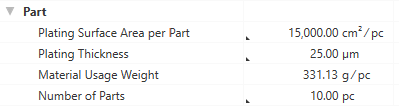
Based on these inputs, additional values are calculated and shown at the process in the Details view > Calculation
view scheme (combobox) under Manufacturing Valuation.
Step 5: Select Machine and Define Times
In der Details view > Calculation view scheme (combobox) unter Fertigungsmodus > Maschine können Sie die gewünschte Maschine auswählen. The selection list only contains machines that fit to the manufacturing method "Coating".
Select Machine and Define Times
-
Select the machine for the process in the Details view > Calculation
view scheme (combobox):Machine Machine Selection Nickel-plate Fa Blasberg Automatic plant Electroless Nickel, 250 kg/h
-
Enter further values:
Cleaning / Degreasing Primary Processing Time (Cleaning) 56 s / cycle
Loading/Unloading Time 85 s / cycle Based on the defined details, the cycle time is calculated.
Step 6: Define Fixtures
In addition to the machine, you can also maintain values for fixtures, as well as for their maintenance. The corresponding object is added to the structure later (fields that are not required can be left empty).
Define Details for Fixtures
- Enter the following values in the Details view > Calculation view scheme (combobox) under Manufacturing Valuation > Fixtures:
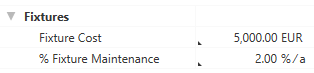
Step 7: Complete Structure
Based on your entries, the BOM structure of the cost model is being automatically created via the "Complete Structure" function.
Complete structure of cost model
- In the Structure view select the process
- Right-click > Complete Structure.
- the selected material
- the selected machine
- a worker
- fixtures
Alternative: F11 in the Structure view or Details view.
The structure is automatically generated based on your entries, and costs are being calculated.
Further changes are not applied immediately.
Perform the "Complete Structure" action again after every change to update your cost model.
All previously selected resources are inserted under the process
Calculated Values of the Cost Model
The following values are calculated using the data entered and then shown in the Details > Calculation view scheme:
- Cycle Time
- Cycles per Time
- Output per Cycle
- Output per Time
- Time per Unit Output
- Absolute Frequency of Occurrence
- Percentaged Frequency of Occurrence
Properties of the Electroplating cost model (Calculation > Manufacturing Valuation)
Material Group
The material properties used to calculate the cost model are shown in this group.
Material Classification
Selection of the material classification as basis for selecting the material. Usually the selection is made in the General Properties view schema and will then be assumed to the "Material" group in the Calculation view schema.
Under Details > General Properties:
|
|
|
 Selection from list directly possible.
Under Details > Calculation:
 Indirect input is possible using F12.
Material Selection
Selection of the material.
|
|
|
Density
Density of the material.
 This value is required.
This value can be managed at the material (Details > Technical Data view scheme), or is applied when global templates are inserted.
Electrochemical Equivalent
Equivalent value to indicate how much or how strong the material is deposited during electroplating.
Indirect input is possible using F12.
Depends on: Material Classification
Current Density
Enter the electrical current per area that is set for the coating of the part.
Indirect input is possible using F12.
Depends on: Material Classification
Total Material Weight
Display of the total weight of the material used for electroplating.
Is calculated from:
- Plating Surface Area per Part ("Part" group)
- Plating Thickness ("Part" group)
- Number of Parts ("Part" group)
Depends on:
- Density
Part group
The properties of the part to be electroplated that are used for calculating the cost model are shown in this group.
Plating Surface Area per Part
Enter the area that is electroplated per part.
|
|
|
Plating Thickness
Enter the thickness of the layer to be electroplated.
|
|
|
Material Usage Weight
Displays the material weight per electroplated part.
Is calculated from:
- Total Material Weight ("Material" group)
Number of Parts
Enter how many parts (covered by a jig or barrel) are electroplated. Initially, the value "1" is set.
|
|
|
Machine Group
The machine properties used to calculate the cost model are shown in this group.
Machine Selection
Select a machine. A suitable selection list of machines is offered based on the previously set manufacturing method in the Details > General Properties view.
|
|
|
Galvanic Efficiency
Efficiency of galvanic electrolytes. The value is taken from the master data and has direct impact on the Electroplating Time.
Indirect input is possible using F12.
Depends on: Material Classification
Loading/Unloading Time
Enter the time required to load and unload the machine for the electroplating process.
 Direct input is possible.
Total Plating Surface Area
Total surface that is electroplated.
Is calculated from:
- Plating Surface Area per Part
- Number of Parts
Electroplating Time
Displays the total time required for electroplating.
Is calculated from:
- Electrochemical Equivalent
- Current Density
- Plating Thickness
- Loading/Unloading Time ("Machine" group)
Depends on:
- Material Classification
- Galvanic Efficiency
Cleaning / Degreasing group
The times required to clean the electroplating machine are displayed in this group.
Primary Processing Time (Cleaning)
Time in which the actual activity of the cleaning process is performed.
Direct input is possible.
Loading/Unloading Time
Enter the time required to load and unload the machine for the cleaning process.
Direct input is possible.
Total Cleaning Time
Displays the total time required for cleaning and degreasing the electroplating machine.
Is calculated from:
- Primary Processing Time (Cleaning)
- Loading/Unloading Time (Cleaning/Degreasing)
Fixtures group
In this group you can define the costs for fixtures, as well as their annual maintenance costs.
Fixture Cost
Costs required for used fixtures.
Direct input is possible.
% Fixture Maintenance
Share of maintenance costs for fixtures per year.
Direct input is possible.