Miscellaneous
This interface allows you to set various default values for properties.
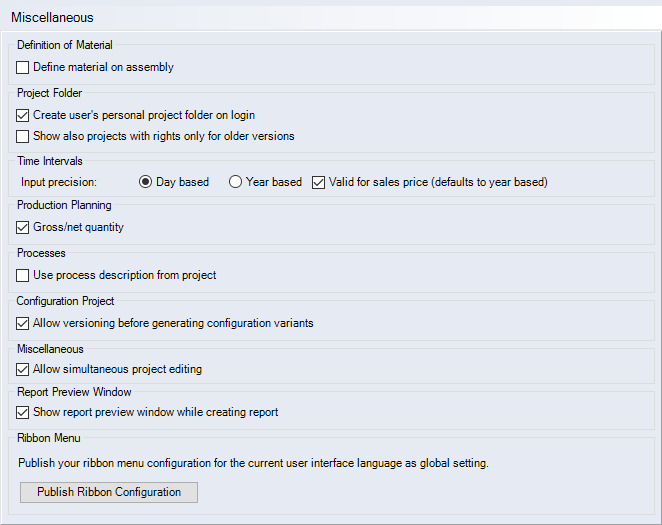
"Definition of Material" group
This group is used to determine whether the definition of materials for assemblies is possible.
-
"Define material on assembly part" checkbox
 The material node appears in the assembly. Basic materials and/or semifinished parts can be created in assemblies. This setting only applies to existing projects and not to new ones.
 The material node for basic materials and/or semifinished parts is disabled in the assembly.
"Project Folder" group
-
"Create user’s personal project folder on login" checkbox
When logging into FACTON for the first time, a user folder is automatically generated in the Workspace Explorer.
NoteRestart the FACTON server after changing this setting.
-
"Show also projects with rights only for older versions" checkbox
When this setting is activated, the user can see but is not allowed to edit the current project version in the Workspace Explorer and has access to previous versions of the project. When this setting is deactivated, the user only sees those projects in the Workspace Explorer for which the user can edit the current version. A project for which the user does not have the right to edit the current version is not shown even when the user has access to previous versions of that project.
"Time Intervals" group
-
"Day based" option
Validities are entered using day, month and year.
-
"Year based" option
Validities are entered in years only.
-
"Valid for sales price (defaults to year based)" checkbox
The sales price is based on the selected option for input accuracy.
-
"Gross/net quantity" checkbox
When this checkbox is activated, a distinction will be made between gross and net quantities in production planning.
"Processes" group
-
"Use process description from project" checkbox
Activate this checkbox to decide whether the description of a process is saved in the project or only displayed in the Data Administration description.
When the checkbox is activated, or no Data Administration process is saved (process deleted), the description of the project process is displayed and can be changed (only in the default language). When the checkbox is deactivated, the description of the Data Administration process that was saved is displayed (depending on the content language). The text cannot be changed. The text cannot be changed.
"Configuration Project" group
-
"Allow versioning before generating configuration variants" checkbox
When the checkbox is activated, the function "Version variants" is activated in the "Create Variants" dialog. This setting applies directly and without a client restart.You can enter a multilingual version name, a status and a comment for the version.
When the checkbox is deactivated, you cannot create variant versions before the variant creation.
"Miscellaneous" group
-
"Allow simultaneous project editing" checkbox
When the checkbox is activated, users can work on a project at the same time. An information dialog appears indicating which user in the system is editing the project or costing type at the same time. Here is an example: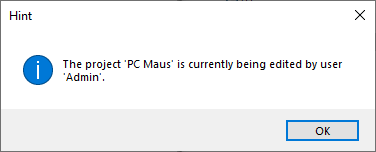
Close the information dialog with "OK". The project or costing type opens.
When the checkbox is deactivated, a project can only be edited by one user at the same time. You can still open the project or the costing type as read-only. Here is an example: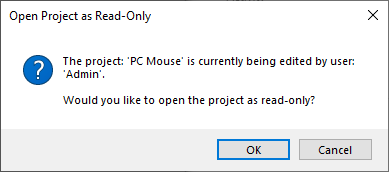
Close the information dialog with "OK". The project or costing type opens.
"Report Preview Window" group
-
"Show report preview window while creating report" checkbox
When this checkbox is activated, the report preview is opened when creating the report and the previously generated pages are displayed. When the checkbox is deactivated, the preview is only opened when the report has been fully created.
"Ribbon Menu" group
-
"Publish Ribbon Configuration" button
Click this button to define the ribbon and quick access toolbar configurations company-wide for all users.
NoteAll user-specific customizations of FACTON users are deleted during publishing.
Publishing must be done separately for each UI language