Copy Batch Data to Excel
You can copy batch data of each category to paste them in MS Excel (for example) including column titles.
Copy batch data to Excel
-
 Open the "Batch Data Administration" Dialog.
Open "Batch Data Administration" dialog
-
Open the "Choose Projects" Dialog.
-
When project is closed:
Right-click on the desired project in the Workspace Explorer and select entry "
 Batch Data Administration" in the context menu.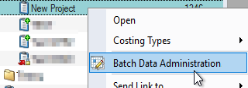
The project is automatically opened in the background. In the front, the "Choose Projects" Dialog opens.
-
When project is already open:
Right-click on the project node and select entry "
Batch Data Administration" in the context menu.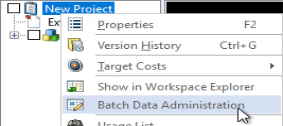
The "Choose Projects" Dialog opens.
-
In the ribbon:
In the ribbon, click on Extras >
Batch Data Administration .The "Choose Projects" Dialog opens.
-
-
Choose your projects and sub-projects on the left side and the properties you wish to edit on the right.
-
Confirm your selection with OK.
The "Batch Data Administration" Dialog opens.
-
-
Click on the category from which you wish to copy data to Excel.
-
Select all batch data with CTRL + A.
-
For copying the batch data click CTRL + C.
The batch data are copied to the clipboard.
-
Switch to MS Excel.
-
For pasting the batch data click CTRL + V.
All selected batch data are inserted into the Excel spreadsheet with the corresponding column headers.
Alternative: Select the batch data row by row while holding CTRL and the the left mouse button.