Network
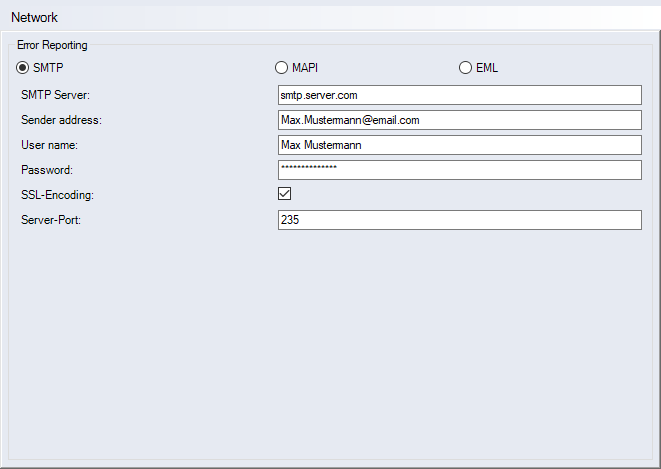
"Error Reporting" group
-
"SMTP" option
After an occurring error message, emails will be sent to FACTON via SMTP. No installed email program is required.
-
"SMTP server" input field
SMTP server to which the emails report FACTON errors. The input field is only available if the SMTP option is selected.
-
"Sender address" input field
Sender address for sending emails. The input field is only available if the SMTP option is selected.
-
"User name" input field
Enter the sender's user name used for authentication on the SMTP server. The input field is only available if the SMTP option is selected.
-
"Password" input field
Enter the sender's password used for authentication on the SMTP server. The input field is only available if the SMTP option is selected.
-
"SSL Encoding" checkbox
Activate the checkbox if you wish to send the email using SSL encoding. The input field is only available if the SMTP option is selected.
-
"Server port" input field
Enter the server port to be used for sending the email. The input field is only available if the SMTP option is selected.
-
-
"MAPI" option
After an occurring error message, emails will be sent to FACTON via MAPI. An installed email program is required to use this option.
-
"EML" option
After an occurring error message, emails will be sent to FACTON via your default email program. An installed email program is required to use this option.
You need to save the email to open it with your default email program and send it to the FACTON Support.