This dialog allows you to search for users you wish to add to a user group.
Note
When using Windows Authentication, the users are searched in the "Microsoft Active Directory".
When using FACTON Authentication, users are searched in the User and Group Administration.
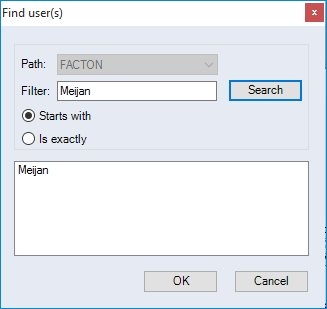
-
"Path" combobox
Displays the path to the "Microsoft Active Directory".
-
"Filter" input field
Enter the search string. At least one character must be entered.
-
"Search" button
The search starts.
-
"Starts with" option
The "Search" function searches for terms starting with the letters entered in the "Filter" input field.
-
"Is exactly" option
The "Search" function searches for terms matching the information entered in the "Filter" input field.