"Version - Properties" dialog
Use this dialog to display and edit the properties of a version of a project.
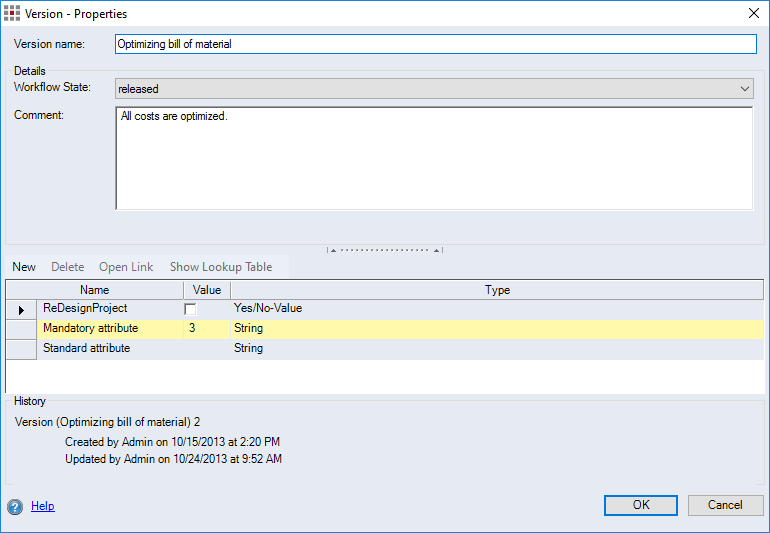
Dialog elements without group
-
"Version name" input field:
Enter a name for the version.
"Details" group
-
"Status" combobox:
Select the status of the version.
-
"Comment" input field:
Enter a comment on the version.
HintIf you wish to add a line break to the comment field, press "CTRL + Enter".
Attribute table
The attribute table displays the version attributes from the system settings in the Attributes interface. You can set additional attributes that only apply for the version you have created.
-
New button:
Create a new attribute that is only valid for this version.
-
Remove button:
Delete the attribute. You can only delete attributes that were created in the "Version properties" dialog. If you created the attribute in the system settings, you can only delete it there.
-
Open Link button:
This button is active if the attribute is of the type "link/reference/document". The link, reference or document displayed in the table's "Value" column can be opened.
-
Show Lookup Table button:
If you created the attribute in the settings and activated "Show Lookup Table", you can display the look-up table here.
-
"Name" column: The name of the attribute
-
"Value" column: A value for the attribute
-
"Type" column: The type of attribute
"Change history" group
Displays the history of changes to the version including the user name and the corresponding date of the change.