Save or Reset Project Elements
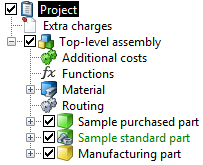
A checkbox is displayed for each project element. This checkbox is used to control the processing status of a project element. Project elements including sub-elements can be individually saved or reset, without affecting the whole project.
|
|
The processing status can be one of the following:
|
|
The checkbox is deactivated. It indicates that the project element is ready for processing by the user. |
|
|
The checkbox is activated. The project element is being processed by the current user. The project remains locked to other FACTON users. When the checkbox is deactivated, the project element can either be saved or reset to its status before processing. |
|
|
The checkbox is highlighted in gray. This indicates that the project element is read-only. This will be case if another FACTON user is currently working on this project element, or if the user does not have access rights for processing this project element. |
 Ready for processing
 In process
 Locked
Individually save or reset project elements
This affects all the project elements subordinated to the saved or reset project element.
- In the project structure, click on the activated checkbox of the project element.
-
Click on the button:
- Yes button: All changes to properties, attributes and the structure under the element are saved.
- No button: All changes to properties, attributes and the structure under the element are undone. This restores the status prior to activating the checkbox.