"Special" Tab
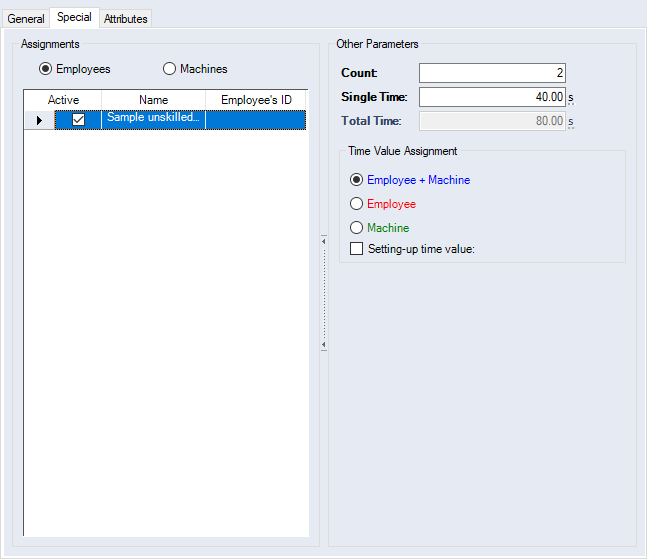
Figure: "Data Administration" dialog, "Work Steps" category, "Special" tab
"Assignments" group
| Option | Description | |
|---|---|---|

|
Workers | Multiple workers can be added and multiple ones can be actively assigned. When assigning a work step in the project, you can activate the "Restricted selection" checkbox in "Work Step Assignment" dialog . Doing so will only display the work steps that are linked to the highlighted worker. |
|
|
Machines | Multiple machines can be added and multiple ones be actively assigned. When assigning a work step in the project, you can activate the "Restricted selection" checkbox in "Work Step Assignment" dialog . Doing so will only display the work steps that are linked to the selected machine. |
"Other Parameters" group
| Entry field | Description | |
|---|---|---|
| Count | Enter the number of workers | |

|
Single Time | The period of time required to carry out the work step. |
| Total Time | The total time results from the product of count and single time | |
"Time Value Assignment" group
| Option | |
| Worker + Machine | Assign the single time value to a machine and a worker |
| Workers | Assign the single time value to a worker |
| Machine | Assign the single time value to a machine |
| Checkbox | |
| Setting-up time value | When this checkbox is activated, the single time value can be used as setup time in the project |
Further Information
- Assign master data
- Worker, "Special" Tab
- Machine, "Special" Tab
- Rights on Data Objects