This dialog allows you to select the new variants you wish to create based on the variant matrix.
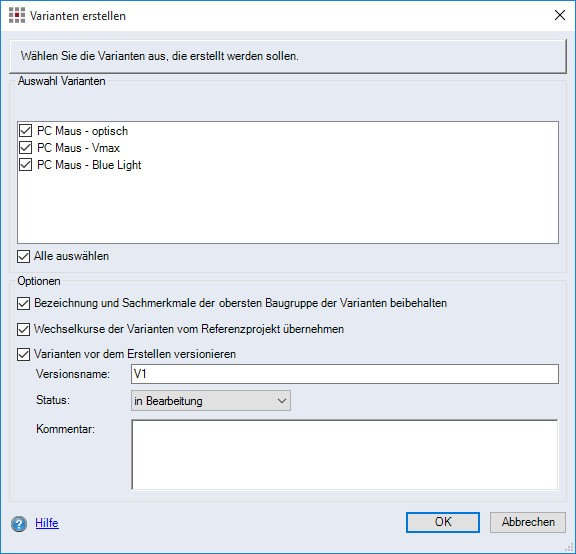
Figure: Create variants dialog
"Variants" group
-
"Selection variants" list:
Select the variants to be generated in this list. When activating a checkbox for a variant, it is included in the generated list.
-
"Select all" checkbox:
When this checkbox is activated, all of the listed variants are selected and generated after confirming the entries and exiting the dialog.
"Options" group
-
"Retain the name and characteristics of the top-level assembly of the variants" checkbox:
When this checkbox is activated, the name and characteristics of the top-level assembly are retained when creating variants for the selected configurations. When this checkbox is deactivated, the name and all of the characteristics for the top-level assembly are overwritten with the data from the maximum BoM.
-
"Apply exchange rates from the reference project to the variants" checkbox:
When this checkbox is activated, the exchange rates from the reference object are transferred for the selected variants.
-
"Version variants before generating" checkbox:
When this checkbox is activated, the current status of the variants is saved and a new version is generated. No versioning reports are generated.
NoteThe "Version variants before generating" checkbox is only visible, if you have activated the checkbox for "Allow versioning before generating configuration variants" in the "System" under "Miscellaneous".