Use this dialog to edit the properties of a project and show project information.
Open Project Properties dialog
- Right-click on the project ► Properties
 .
.
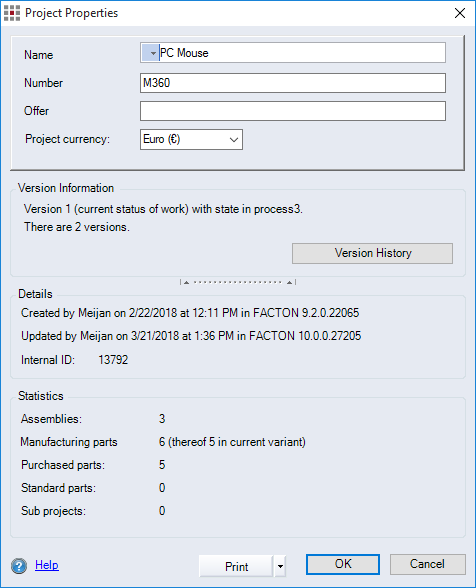
Figure: Project Properties dialog
Dialog elements without group
-
"Name" entry field: Show and enter the project name.
-
"Number" entry field: Enter the number for the project.
-
"Offer" entry field: Enter the offer description of the project.
-
"Project currency" combobox: Select the currency used to calculate the project.
"Version Information" group
This group displays information about the current version and the number of existing versions of the project.
-
Version History button:
The Version History dialog opens.
"Details" group:
This group displays the record of creation and changes to the project along with the internal project ID.
"Statistics" group:
This group displays statistical information about the project.
-
"Assemblies":
Displays the number of assemblies in the project. The number of assemblies with alternatives is shown in brackets.
-
"Production parts":
Displays the number of production parts in the project. The number of production parts with alternatives is shown in brackets.
-
"Standard/Purchased Parts":
Displays the number of purchased/standard parts in the project. The number of purchased/standard parts with alternatives is shown in brackets.
-
"Sub-projects":
Displays the number of sub-projects in the project. The number of sub-projects with alternatives is shown in brackets.